


Autumn Energy Saving Tips: Smart meters are your secret weapon for lower energy bills

25th September, 2026
Welcome to Tuath’s new Autumn Energy Savings Tips series, where we explore how we use energy at home, and look at how we can manage our usage and keep costs down.
Smart meters are digital electricity meters that send your real-time usage information securely to your energy supplier and to ESB Networks. They also give you a clear picture of how much electricity you’re using and when you’re using it, helping you make smarter energy decisions.
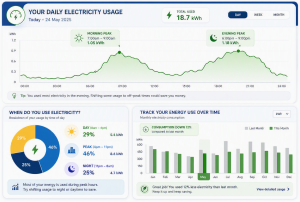
How Smart Meters can help
- Track your usage – View your electricity consumption by day, week, or month.
- Spot energy guzzlers – Identify the times of day when your usage is highest and uncover appliances that may be driving up your bills
- Make small changes – Shift energy-intensive tasks to off-peak or lower-cost periods where possible and reduce unnecessary energy waste.
Monitor your progress – Regularly review your smart meter data to see if your changes are reducing your consumption. - Save money – Lower energy usage can lead to lower bills and help you get more value from your energy plan.
How to access your smart meter
- Visit esbnetworks.ie and select “My Account“.
- Click “Sign Up for Your Online Account“.
- Select “Register Now“.
- Enter your details and create an account using a valid email address.
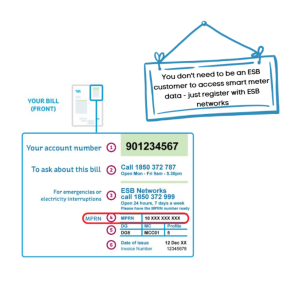
- Provide your MPRN (Meter Point Reference Number) – the 11-digit number found on your electricity bill.
- Complete the account verification process.
- Log in to your ESB Networks account.
- Select ‘View My Smart Meter Usage’ to access your electricity consumption data.
- Start using your insights to identify savings opportunities and reduce your energy costs.
Get involved in making your home and community a great place to live!
get Involved!!Related News
Published on 23rd October, 2026
Autumn Energy Saving Tips: Which energy tariff is right for you?
Choosing the right tariff can make a big difference to your energy bills. Here's a...
Read MOre
Published on 15th October, 2026
Autumn Energy Saving Tips: Bill-pay v pre-pay plans
Do you pay for your electricity and gas via regular bills from your provider, or...
Read MOre
Published on 12th October, 2026
Supporting safer communities: Tuath secures €142,500 Community Safety Fund grant
We’re delighted to share that Tuath has recently been awarded €142,500 through the Department of...
Read MOre